iOS Location Modifier Risks: Why Hardware Spoofing is Safer for Drivers
Understand iOS location modifier risks for delivery apps. QPin changes iPhone system location through hardware for compliant testing and QA workflows.
iOS Location Modifiers and Delivery Apps: Risks, Limits, and Compliant Use
Quick answer: iOS location modifier delivery apps should be treated as a GPS accuracy, risk, and compliance topic, not as a shortcut for live delivery work. This is the policy-focused pillar for users who need the vocabulary of location modification but do not want unsafe instructions. QPin Hardware can change the iPhone system location to a selected coordinate in supported setups, so owned-device GPS stability checks and controlled location tests are repeatable. Users should still follow the rules of the apps and platforms they use.
This guide is written for iPhone users in delivery, ride-hailing, QA, support, and privacy testing scenarios. It explains why delivery apps may show the wrong position, how iOS location modifier risk changes by tool architecture, and how to test location behavior without encouraging misuse.
Risk Comes From the Workflow, Not Just the Coordinate
An iOS location modifier can be used in very different ways. A QA team reproducing a wrong pickup pin on an owned test phone is a low-risk, legitimate workflow. A user installing a patched delivery app, hiding device state, or misrepresenting physical presence during a live platform workflow is a high-risk workflow. The tool category alone does not define the risk; the context, authorization, evidence, and platform rules do.
QPin should be positioned in the lower-risk category: owned-device testing, system-location stability checks, demos, privacy workflows, and support reproduction. Its core technical advantage is that it does not require modifying the delivery app package.
Compliance note
QPin is not affiliated with DoorDash, Uber Eats, Amazon Flex, Spark Driver, Walmart, Uber, Lyft, or any delivery platform. Users should follow the rules of the apps and platforms they use. QPin is designed for owned-device testing, GPS stability checks, demos, privacy, QA, and authorized workflows.
This article does not provide instructions for evading DoorDash, Uber Eats, Amazon Flex, Spark Driver, Walmart, Uber, Lyft, or any platform checks. It does not promise marketplace advantages, queue outcomes, account outcomes, or universal compatibility with any delivery app.
The Risk Depends on How the Location Modifier Works
For iOS location modifier searches, the tool architecture matters more than the marketing claim. A modified app changes the target app package. A random profile may leave inconsistent device state. A desktop workflow can be useful but may depend on a lab setup. QPin focuses on the iPhone system-location layer without modifying the delivery app package.
That distinction is the risk story. A clean system-location test can be verified in Apple Maps before any delivery app opens. A modified or cloned app starts with a damaged trust surface even before the coordinate changes. For QA, support, demos, privacy, and owned-device GPS checks, the safer message is hardware-isolated system-location testing.
Delivery platforms may still use account, network, sensor, timing, geofence, and policy checks, so QPin should be positioned as a location testing device, not a promise of platform acceptance.
Risk Audit Checklist Before Using Any iOS Location Modifier
Before choosing an iOS location modifier, review the workflow like a risk audit rather than a feature list. The safest-looking marketing page can still create a poor testing environment if it asks you to change the target app, install unknown profiles, or hide device state.
QPin fits the lower-risk side because it is meant to keep the target delivery app out of the modification path. That does not remove every platform risk, but it gives teams a cleaner baseline: the iPhone system location changes, the app package stays original, and the evidence can be captured before and after the test.
Platform-specific risks and limitations
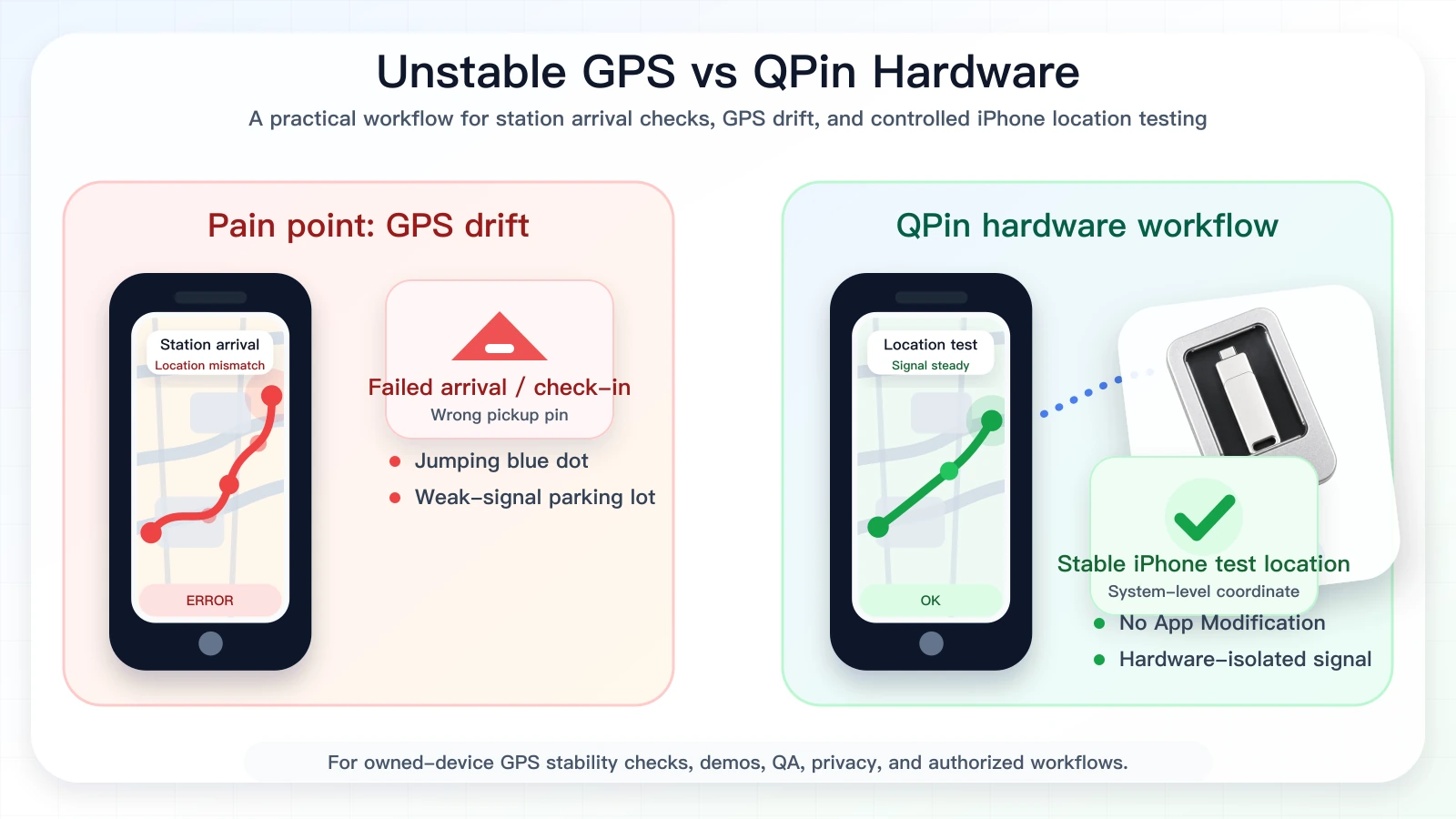
iOS location modifier testing for delivery apps can sound like a shortcut, but the useful and supportable use case is controlled iPhone location testing around known coordinates. When a phone jumps in a weak-signal area, a pin does not match the entrance, or an app screen needs to be verified, QPin can change the iPhone system location to a selected coordinate in supported setups. That lets Apple Maps, QA builds, delivery apps, and other apps that rely on iOS Location Services be compared against the same known test point. Live platforms may still use account, network, sensor, geofence, timing, and policy checks, so use QPin as an owned-device testing workflow rather than a promise that any delivery platform will accept a coordinate in every flow.
For live work, keep the requirement simple: if a delivery app expects truthful physical presence at a store, station, customer address, or curbside area, follow that requirement. For testing, use QPin on a phone you own to reproduce issues around pickup pins, drop-off pins, live navigation, and weak-signal parking lots, record screenshots before and after changing the iPhone system location, and then use those notes for QA, demos, support evidence, or authorized troubleshooting.
Common causes of GPS drift or wrong location
For a broader checklist, start with iPhone GPS jumping or drifting fixes. If the issue is specifically a pickup pin, compare the process in Uber pickup location wrong on iPhone.
Safer testing workflow with QPin
Use QPin when you need to intentionally set an owned iPhone to a known coordinate, keep that coordinate stable, and compare what Apple Maps and delivery apps show. In supported setups, the hardware workflow changes the iPhone system location itself rather than patching one app, which makes it useful for reproducing GPS drift, wrong pickup pins, location jumping, and app-location mismatches.
A safer workflow looks like this:
- Confirm the problem first in Apple Maps and another map app.
- Check Location Services, Precise Location, Wi-Fi, Low Power Mode, and VPN status.
- Document the original behavior with screenshots and timestamps.
- Use QPin Desktop or the macOS/Windows setup guide to choose a test coordinate and apply it to the iPhone system location over USB, or use QPin Android when an Android phone is the USB controller.
- For portable controlled testing, review the QPin Hardware Manual.
- Return the iPhone to real GPS after the test and re-check the app.
After QPin changes the iPhone system location, apps that rely on iOS Location Services usually reflect the selected test coordinate. Delivery apps can still apply their own account, network, sensor, timing, and policy checks, so use this only where you are allowed to test location behavior.
Troubleshooting checklist
- Turn Wi-Fi on, even if you do not join a network.
- Confirm Precise Location is enabled for the target app.
- Disable Low Power Mode during diagnosis.
- Compare Apple Maps, Google Maps, and the platform app.
- Take screenshots before contacting support.
- Do not use location tools to misrepresent active marketplace work.
If the issue repeats in one location only, record the address, parking area, store entrance, screenshots, time, and network state. If it repeats across many unrelated places, the iPhone settings, iOS version, app version, or device hardware may be more likely than a single bad map pin.
FAQ
Is iOS location modifier delivery apps safe?
It depends on the use case. Testing your own device in an authorized QA, privacy, demo, or support workflow is different from misrepresenting location during live delivery work. Follow platform rules and local laws.
Can QPin make delivery apps accept a selected test location?
No. QPin works with the iOS system location layer in supported setups, but delivery apps can apply its own account, network, sensor, geofence, and policy checks.
What should I do if the app is wrong while I am physically present?
First check iPhone settings, compare map apps, refresh the app, and collect screenshots with timestamps. If the platform workflow still fails, use official support rather than forcing a different location in verification screens.
When should I use QPin?
Use QPin when you are allowed to test location behavior on a device you own, need repeatable GPS stability checks, want a controlled demo, or need a QA workflow. Start from the QPin product overview or the delivery and ride-hailing GPS stability hub.
Related guides
- Best iPhone GPS stability tool for delivery and ride-hailing drivers
- QPin Desktop for Mac and Windows
- QPin macOS/Windows setup guide
- QPin Android setup guide
- QPin Hardware Manual
- iPhone GPS jumping or drifting fixes
FAQ
Can QPin replace platform rules or delivery app checks?
No. QPin is not a platform-override tool and should not be used to misrepresent location or evade platform rules. It is designed for owned-device testing, GPS stability checks, demos, privacy, QA, and authorized workflows.
Why does delivery apps show the wrong location on iPhone?
Common causes include weak GNSS signal, indoor pickup areas, stale Wi-Fi or cell assistance data, disabled Precise Location, map pin errors, VPN or network mismatches, and app-side risk controls.
What is a safer way to test iPhone location behavior?
Use a phone you own, test only where you are allowed, record before-and-after evidence, compare Apple Maps with the target app, and avoid live workflows that depend on truthful physical presence.
Does Precise Location fix every delivery app GPS issue?
No. Precise Location is important, but delivery apps may also use map data, account state, network signals, sensor movement, geofences, and policy checks.