How to Change iPhone Location on Mac: QPin Desktop Guide
Learn how to change iPhone location on a Mac with QPin for Desktop. This guide explains the setup, what you need, who the Mac workflow fits, and when to choose Mac software instead of hardware.
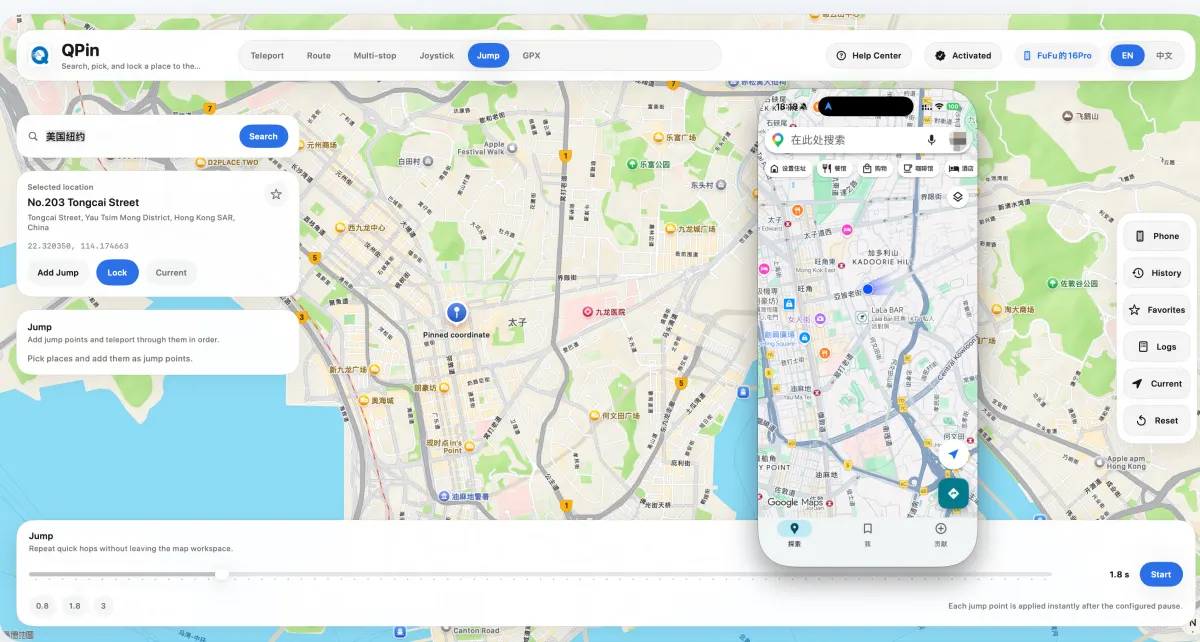
iPhone Location Changer for Mac in 2026
If your question is simple, the answer is also simple: yes, you can change iPhone location on a Mac without jailbreak. The usual workflow is to connect the iPhone to a Mac by USB, use a desktop location tool, pick the target point on the map, and apply it during the session.
QPin for Desktop is the QPin software version built for that workflow. It is designed for users who prefer a desktop setup, want a map-based interface on macOS, and only need location change during specific work, testing, or app sessions.
Quick Answer
QPin for Desktop is usually the right fit if you want:
- a no-jailbreak iPhone location changer for Mac
- a desk-based workflow with a larger screen
- USB control instead of a separate hardware accessory
- location search, joystick, and GPX-style movement tools in one Mac app
It is usually not the first choice if you want:
- a fully portable workflow away from your desk
- location control without keeping a Mac nearby
- a Bluetooth-only or hardware-only setup
For that comparison, read Software vs Hardware GPS Spoofers.
What QPin for Desktop Actually Is
QPin for Desktop is the software edition of QPin. Instead of using a dedicated external device, this version uses a Mac + iPhone + USB workflow.
The practical flow looks like this:
- Install the Mac app
- Connect the iPhone by USB
- Enable Developer Mode on the iPhone during first-time setup
- Search a city, address, or coordinate in the Mac app
- Apply the target point and verify it in the destination app
That makes it a good fit for users who are already comfortable working from a Mac and want a direct, screen-based way to manage location changes.
Who Should Choose the Desktop Software Version
The Mac software version is better for:
- users who already sit at a Mac during use
- users who want the map, search, and movement tools on a larger display
- users who only need location change during short sessions
- users who are testing apps, checking region behavior, or managing repeated desktop tasks
The hardware version is often better for:
- users who want portability
- users who do not want to stay attached to a computer
- users who prefer a Bluetooth and power-only workflow
If you are evaluating the hardware route, see the QPin Hardware Manual.
What You Need Before Starting
Before using QPin for Desktop, prepare:
- a Mac
- an iPhone
- a stable USB data cable
- your activation code from the order page or email
- Developer Mode enabled on the iPhone during first-time setup
If the iPhone is being connected for the first time, keep it unlocked so you can complete the trust prompt immediately.
Desktop Software vs Hardware: Fast Decision Table
This is the practical difference: Mac software is convenient for controlled desktop sessions, while hardware is stronger for portability.
Basic QPin for Desktop Workflow
1. Install and activate the software
Install QPin for Desktop, then enter the activation code from your order page or email. This is the point where the software license becomes usable on your Mac.
2. Connect the iPhone by USB
Use a data-capable cable, keep the iPhone unlocked, and accept any trust prompt shown by iOS or macOS.
3. Enable Developer Mode
For the Mac software workflow, Developer Mode must be enabled on the iPhone before the first location change. This is part of the normal first-time setup path for QPin for Desktop.
4. Search and apply the target location
Use the map interface to search an address, city, or coordinate, then apply that point to the connected iPhone.
5. Verify the result in the destination app
Open the destination app and confirm that the new point is being used. After you finish, disconnect the cable and restart the iPhone to restore the real GPS location.
For the full step-by-step walkthrough, use the QPin Desktop for macOS Setup Guide.
What Features Users Usually Expect from a Mac Location Changer
When users search for an iPhone location changer for Mac, they usually want more than just one teleport button. The expected feature set includes:
- point-to-point location change
- joystick control
- movement by speed
- multi-stop jumping
- route or GPX-style workflows
- quick recovery back to real GPS
That is the reason the Mac version matters: it is not only about changing one point once. It is about having a repeatable desktop workflow that is easier to manage on a larger screen.
Common Questions Before Buying the Mac Version
Do I need jailbreak?
No. QPin for Desktop is designed as a no-jailbreak workflow.
Do I need to keep the Mac nearby?
Yes, you should treat the Mac workflow as a connected desktop session. If you want day-to-day portability without relying on a computer, hardware is usually the better fit.
Is this page the same as the setup guide?
No. This page is the broader answer page for users comparing methods and deciding whether the Mac software version fits their workflow. The dedicated install tutorial is here: QPin Desktop for macOS Setup Guide.
Is there a video tutorial too?
Yes. Use the QPin Video Tutorials page for the video walkthrough library.
Related Guides
- QPin Desktop for macOS Setup Guide
- Software vs Hardware GPS Spoofers
- QPin Hardware Manual
- QPin Video Tutorials
Conclusion
If you are searching for an iPhone location changer for Mac, the practical answer is to choose a tool that matches your workflow. QPin for Desktop is the desktop path for users who want a no-jailbreak, map-based, USB-connected process on macOS. If your usage happens mainly at a desk, this is the version to evaluate first.
FAQ
Can I change iPhone location on a Mac without jailbreak?
Yes. A Mac workflow such as QPin for Desktop changes the location through a computer-assisted process and does not require jailbreaking the iPhone.
What do I need before using QPin for Desktop?
You need a Mac, an iPhone, a data-capable USB cable, the QPin software activation code, and Developer Mode enabled on the iPhone during first-time setup.
When is Mac software a better choice than hardware?
Mac software is usually the better fit when you work from a desk, only need location change during specific sessions, and prefer a map-based workflow with USB control.
Do I need to keep the iPhone connected during use?
For the Mac software workflow, you should assume the iPhone needs to remain connected during the active session unless the app shows otherwise.